머신러닝 스터디 3주차 - Simple CNN 모델로 이미지 학습하기
03/20
교재(컴퓨터 비전과 딥러닝 - 라쟈링가파 샨무갸마니 p.97)
개와 고양이를 예측하는 모델 훈련시키기
1. Kaggle에서 개와 고양이 이미지를 다운받는다.
(https://www.kaggle.com/c/dogs-vs-cats/data)
2. 다운받은 이미지 중에서 train 폴더에 있는 이미지의 일부만 사용한다.
3. 교재의 simple cnn 코드를 활용해서 이미지 학습을 시킨다.
| # 이미지 데이터 출처 kaggle.com/c/dogs-vs-cats/data | |
| # tensorflow, pillow, SciPy | |
| print("==========================") | |
| print("====loading settings======") | |
| import tensorflow as tf | |
| import os | |
| import shutil | |
| work_dir = 'C:/Users/BY/Downloads/dogs-vs-cats/train/' #디렉토리 지정 | |
| image_names = sorted(os.listdir(os.path.join(work_dir, 'train'))) | |
| def copy_files(prefix_str, range_start, range_end, target_dir): | |
| image_paths = [os.path.join(work_dir, 'train', prefix_str+'.'+str(i)+'.jpg') | |
| for i in range(range_start, range_end)] | |
| dest_dir = os.path.join(work_dir, 'data', target_dir,prefix_str) | |
| os.makedirs(dest_dir) | |
| for image_path in image_paths: | |
| shutil.copy(image_path, dest_dir) | |
| # 실습을 위해 고양이와 개 이미지를 1,000개만 사용 | |
| print("==========================") | |
| print("====copy image files======") | |
| copy_files('dog', 0, 10, 'train') | |
| copy_files('cat', 0, 10, 'train') | |
| copy_files('dog', 10, 14, 'test') | |
| copy_files('cat', 10, 14, 'test') | |
| # 간단한 CNN으로 벤치마킹. 교재의 simple_cnn 모델 | |
| print("==========================") | |
| print("====define cnn model======") | |
| image_height, image_width = 150, 150 | |
| train_dir = os.path.join(work_dir+'data/', 'train') | |
| test_dir = os.path.join(work_dir+'data/', 'test') | |
| no_classes = 2 | |
| no_validation = 8 #800 | |
| epochs = 2 | |
| batch_size = 2 #200 | |
| no_train = 20 #2000 | |
| no_test = 8 #800 | |
| input_shape = (image_height, image_width, 3) | |
| epoch_steps = no_train // batch_size # 여기가 0이 되어버리면 | |
| # AttributeError: 'ProgbarLogger' object has no attribute 'log_values' 에러 발생 | |
| test_steps = no_test // batch_size | |
| def simple_cnn(input_shape): | |
| model = tf.keras.models.Sequential() | |
| model.add(tf.keras.layers.Conv2D( | |
| filters=75, # 64 | |
| kernel_size=(3,3), | |
| activation='relu', | |
| input_shape=input_shape | |
| )) | |
| model.add(tf.keras.layers.Conv2D( | |
| filters=150, # 128 | |
| kernel_size=(3,3), | |
| activation='relu', | |
| )) | |
| model.add(tf.keras.layers.MaxPooling2D(pool_size=(2,2))) | |
| model.add(tf.keras.layers.Dropout(rate=0.3)) | |
| model.add(tf.keras.layers.Flatten()) | |
| model.add(tf.keras.layers.Dense(units=32, activation='relu')) # 1024 | |
| # tensorflow.python.framework.errors_impl.ResourceExhaustedError: OOM when allocating tensor with shape[799350,1024] and type float on /job:localhost/replica:0/task:0/device:CPU:0 by allocator cpu | |
| model.add(tf.keras.layers.Dropout(rate=0.3)) | |
| model.add(tf.keras.layers.Dense(units=no_classes, activation='softmax')) | |
| model.compile(loss=tf.keras.losses.categorical_crossentropy, | |
| optimizer=tf.keras.optimizers.Adam(), | |
| metrics=['accuracy']) | |
| return model | |
| simple_cnn_model = simple_cnn(input_shape) | |
| # 한번에 이미지 묶음 하나씩만 로드. | |
| # tf.keras에 ImageDataGenerator라는 클래스는 필요할 때마다 이미지를 읽음 | |
| generator_train = tf.keras.preprocessing.image.ImageDataGenerator(rescale=1. /255) | |
| generator_test = tf.keras.preprocessing.image.ImageDataGenerator(rescale=1. / 255) | |
| # 디렉터리로부터 이미지를 읽어오는 flow_from_directory 메소드 | |
| train_images = generator_train.flow_from_directory( | |
| train_dir, | |
| batch_size = batch_size, | |
| target_size = (image_width, image_height)) | |
| test_images = generator_test.flow_from_directory( | |
| test_dir, | |
| batch_size = batch_size, | |
| target_size = (image_width, image_height)) | |
| # generator (생성기)는 모델을 학습시키기 위해 직접적으로 사용할 수 있다. | |
| print("==========================") | |
| print("====fitting cnn model=====") | |
| simple_cnn_model.fit_generator( | |
| train_images, | |
| steps_per_epoch=epoch_steps, | |
| epochs=epochs, | |
| validation_data=test_images, | |
| validation_steps=test_steps) |
코드 업로드 (https://github.com/BY1994/TIL/blob/master/Python/Tensorflow/07_Dogs_Cats_simple_cnn_keras.py)
4. 학습 결과
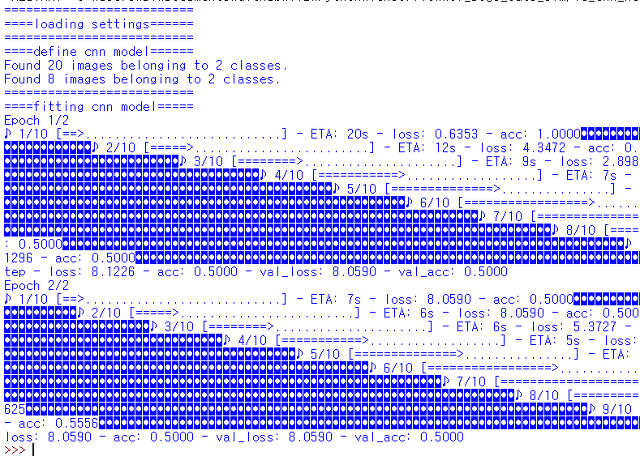
- 정확도는 거의 50% 안팎으로 나와서, 학습이 잘 되지 않았다.
- Anaconda를 설치하지 않아서 tensorflow 외에 이미지 처리를 위한 pillow와 연산을 위한 SciPy를 직접 설치해줘야했다! (cmd로 pip install을 사용했다)
- 또한 CPU의 부담이 너무 커서 python shell이 자꾸 죽었기 때문에 이미지는 교재의 가이드처럼 1000개를 사용하지 못하고 개수를 계속 줄여서 학습시켰다.
- shell을 죽지 않게 하는데 가장 큰 영향을 준 것은 model.add(tf.keras.layers.Dense(units=32, activation='relu')) 이 부분의 units가 원래 1024개였는데, 이것을 크게 줄였더니 코드가 정상적으로 실행되었다.
- 교재의 코드는 변수가 하드코딩되어있기 때문에, 이미지의 개수를 다르게 할 경우 no_validation, batch_size, no_train, no_test를 일일히 바꾸어줘야한다.
+ 데이터셋 확장하기
훈련 중 노이즈를 유발해서 데이터 셋의 크기를 늘린다.
generator_train 부분의 코드만 변경하면 데이터셋 크기를 늘려서 학습시킬 수 있다.
(https://github.com/BY1994/TIL/blob/master/Python/Tensorflow/08_Dogs_Cats_simple_cnn_keras_data_augmentation.py)
+ MNIST 데이터 API를 이용해 학습시키고 시각화 하기
| """ | |
| 텐서플로 레이어 API에서 제공하는 메소드 이용 | |
| """ | |
| import tensorflow as tf | |
| from tensorflow.examples.tutorials.mnist import input_data | |
| mnist_data = input_data.read_data_sets('MNIST_data', one_hot = True) | |
| input_size = 784 | |
| no_classes = 10 | |
| batch_size = 100 | |
| total_batches = 200 | |
| x_input = tf.placeholder(tf.float32, shape=[None, input_size]) | |
| y_input = tf.placeholder(tf.float32, shape=[None, no_classes]) | |
| # 텐서보드를 사용해 훈련 프로세스를 시각화 | |
| # 변수의 통계를 시각화하려면 tf.summary에 변수의 통계값이 추가되어야한다. | |
| def add_variable_summary(tf_variable, summary_name): | |
| with tf.name_scope(summary_name + '_summary'): | |
| mean = tf.reduce_mean(tf_variable) | |
| tf.summary.scalar('Mean', mean) | |
| with tf.name_scope('standard_deviation'): | |
| standard_deviation = tf.sqrt(tf.reduce_mean( | |
| tf.square(tf_variable - mean))) | |
| tf.summary.scalar('StandardDeviation', standard_deviation) | |
| tf.summary.scalar('Maximum', tf.reduce_max(tf_variable)) | |
| tf.summary.scalar('Minimum', tf.reduce_min(tf_variable)) | |
| tf.summary.histogram('Histogram', tf_variable) | |
| # 이전 모델과 달리 MNIST 데이터를 정사각형 형태로 크기를 변경하고 2차원 이미지 형태로 사용 | |
| # 이미지를 28 x 28 이미지 픽셀 크기로 변형 | |
| x_input_reshape = tf.reshape(x_input, [-1, 28, 28, 1], | |
| name = 'input_reshape') | |
| # => 차원값이 -1이라는 것은 배치 크기가 임의의 수가 될 수 있음을 의미 | |
| # => name은 텐서보드 그래프에 반영돼 쉽게 이해할 수 있음 | |
| # 입력, 필터, 커널, 활성화가 정의된 2D 컨볼루션 레이어 정의 | |
| def convolution_layer(input_layer, filters, kernel_size = [3, 3], | |
| activation = tf.nn.relu): | |
| layer = tf.layers.conv2d( | |
| inputs = input_layer, | |
| filters = filters, | |
| kernel_size = kernel_size, | |
| activation = activation, | |
| ) | |
| add_variable_summary(layer, 'convolution') | |
| return layer | |
| # => kernel_size와 activation에 대한 디폴트 값을 줌 | |
| # => 요약 데이터는 레이어에 추가되고, 해당 레이어는 반환됨 | |
| # => 함수를 호출할 때마다 input_layer가 매개변수로 주입되어야함 | |
| # 풀링 레이어에 대한 함수 | |
| def pooling_layer(input_layer, pool_size = [2,2], strides = 2): | |
| layer = tf.layers.max_pooling2d( | |
| inputs = input_layer, | |
| pool_size = pool_size, | |
| strides = strides | |
| ) | |
| add_variable_summary(layer,'pooling') | |
| return layer | |
| # => pool_size와 strides 디폴트 값이 주어지지만 필요한 경우 변경 가능 | |
| # => 마찬가지로 레이어에 요약 데이터 추가됨 | |
| # 밀집 레이어 정의 | |
| def dense_layer(input_layer, units, activation=tf.nn.relu): | |
| layer = tf.layers.dense( | |
| inputs = input_layer, | |
| units = units, | |
| activation = activation | |
| ) | |
| add_variable_summary(layer, 'dense') | |
| return layer | |
| # => activation에 대한 기본값을 갖고 있으며, 변수 요약 데이터 추가 | |
| # 레이어들은 그래프로 연결되었으며, 아직 초기화되기 전이다. | |
| # 첫번째 컨볼루션 레이어에서 샘플링된 특성을 더 나은 특성으로 변환하기 위해 | |
| # 새로운 컨볼루션 레이어 추가 가능 | |
| convolution_layer_1 = convolution_layer(x_input_reshape, 64) | |
| pooling_layer_1 = pooling_layer(convolution_layer_1) | |
| convolution_layer_2 = convolution_layer(pooling_layer_1, 128) | |
| pooling_layer_2 = pooling_layer(convolution_layer_2) | |
| flattened_pool = tf.reshape(pooling_layer_2, [-1, 5*5*128], | |
| name='flattened_pool') | |
| dense_layer_bottleneck = dense_layer(flattened_pool, 1024) | |
| # => 컨볼루션 레이어 간의 유일한 차이점은 필터 크기 | |
| # => 커널과 스트라이드 매개변수 값을 선택하는 것은 임의이며 경험에 의해 선택 | |
| # => 밀집 레이어 API는 단일 차원의 벡터를 특정 개수의 숨겨진 유닛(1024개)에 매핑시킨다. | |
| # => 숨겨진 레이어는 ReLU 활성화 함수로 이어져 비선형 연산이 되다. | |
| # 드롭아웃 확률을 가진 드롭아웃 레이어 | |
| # 훈련 모드는 드롭아웃 적용 여부에 따라 True 또는 False로 설정할 수 있으며, 훈련을 위해 | |
| # True로 설정한다. 하지만 정확도 계산시 해당 값이 변경되어야해서 부울 값을 저장해둔다. | |
| dropout_bool = tf.placeholder(tf.bool) | |
| dropout_layer = tf.layers.dropout( | |
| inputs = dense_layer_bottleneck, | |
| rate = 0.4, | |
| training = dropout_bool | |
| ) | |
| # 드롭아웃 레이어를 로짓이라는 밀집 레이어에 주입 | |
| # 로짓은 클래스 개수로 이어지는 활성화 함수를 가진 마지막 레이어 | |
| logits = dense_layer(dropout_layer, no_classes) | |
| # 이전처럼 로짓이 소프트맥스 레이어를 통과한 후 교차 엔트로피 계산을 수행 | |
| # 텐서보드의 좀 더 나은 시각화를 위해 이름 범주에 추가 | |
| with tf.name_scope('loss'): | |
| softmax_cross_entropy = tf.nn.softmax_cross_entropy_with_logits( | |
| labels=y_input, logits=logits) | |
| loss_operation = tf.reduce_mean(softmax_cross_entropy, name='loss') | |
| tf.summary.scalar('loss', loss_operation) | |
| # 손실 함수를 tf.train API의 메소드를 이용해 최적화 | |
| with tf.name_scope('optimiser'): | |
| optimiser = tf.train.AdamOptimizer().minimize(loss_operation) | |
| # 정확한 예측값과 정확도 계산을 위해 이름 범주를 추가 | |
| # 정확도에 대한 스칼라 요약 데이터도 추가 | |
| with tf.name_scope('accuray'): | |
| with tf.name_scope('correct_prediction'): | |
| predictions = tf.argmax(logits, 1) | |
| correct_predictions = tf.equal(predictions, tf.argmax(y_input, 1)) | |
| with tf.name_scope('accuracy'): | |
| accuracy_operation = tf.reduce_mean( | |
| tf.cast(correct_predictions, tf.float32)) | |
| tf.summary.scalar('accuracy', accuracy_operation) | |
| # 세션을 시작하고 변수를 초기화 | |
| session = tf.Session() | |
| session.run(tf.global_variables_initializer()) | |
| # 요약 데이터를 모두 합쳐야하며, 훈련 요약 데이터와 테스팅 요약 데이터를 작성 | |
| # 하기 위한 파일도 정의 | |
| merged_summary_operation = tf.summary.merge_all() | |
| train_summary_writer = tf.summary.FileWriter('/tmp/train', session.graph) | |
| test_summary_writer = tf.summary.FileWriter('/tmp/test') | |
| # 배치에서 데이터가 로드되고 훈련을 시작 | |
| test_images, test_labels = mnist_data.test.images, mnist_data.test.labels | |
| for batch_no in range(total_batches): | |
| mnist_batch = mnist_data.train.next_batch(batch_size) | |
| train_images, train_labels = mnist_batch[0], mnist_batch[1] | |
| _, merged_summary = session.run([optimiser, merged_summary_operation], | |
| feed_dict={ | |
| x_input: train_images, | |
| y_input: train_labels, | |
| dropout_bool: True | |
| }) | |
| train_summary_writer.add_summary(merged_summary, batch_no) | |
| if batch_no % 10 == 0: | |
| merged_summary, _ = session.run([merged_summary_operation, | |
| accuracy_operation], feed_dict={ | |
| x_input: test_images, | |
| y_input: test_labels, | |
| dropout_bool: False | |
| }) | |
| test_summary_writer.add_summary(merged_summary, batch_no) |
(코드 업로드: https://github.com/BY1994/TIL/blob/master/Python/Tensorflow/05_MNIST_Multilayer_convolution.py)
위의 코드를 실행시킨 후, cmd 창에서 다음과 같은 주소로 이동한다.

=> tensorboard --logdir=/tmp/train을 하면 training 과 관련된 시각화 결과를,
tensorboard --logdir=/tmp/test를 하면 test와 관련된 시각화 결과를 볼 수 있다.
그리고 브라우저에서 localhost:6006 을 입력하면 시각화된 결과물을 확인할 수 있다.
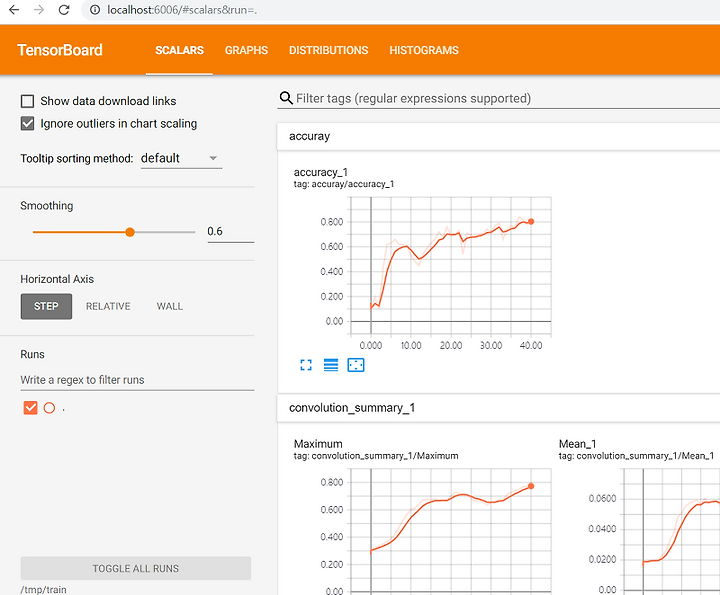
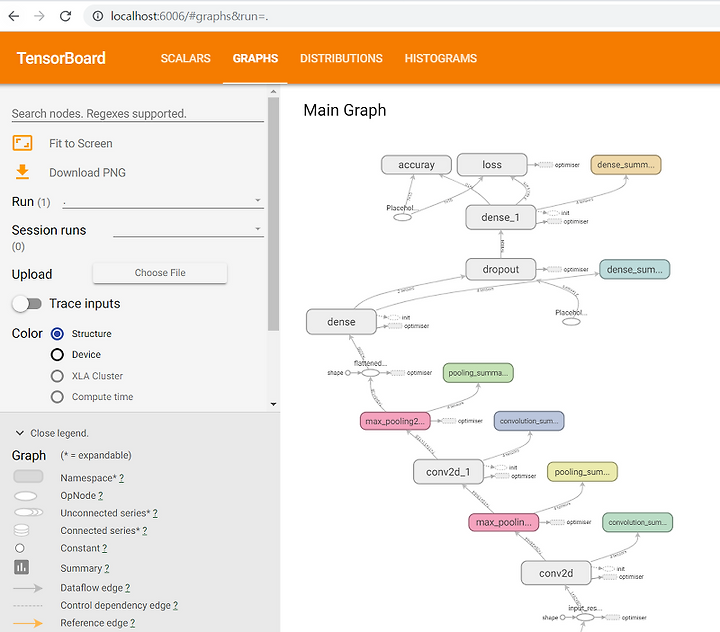
이는 Scalar 탭의 결과물이고, Graph 탭에서는 다음과 같은 모델의 시각화를 볼 수 있다.